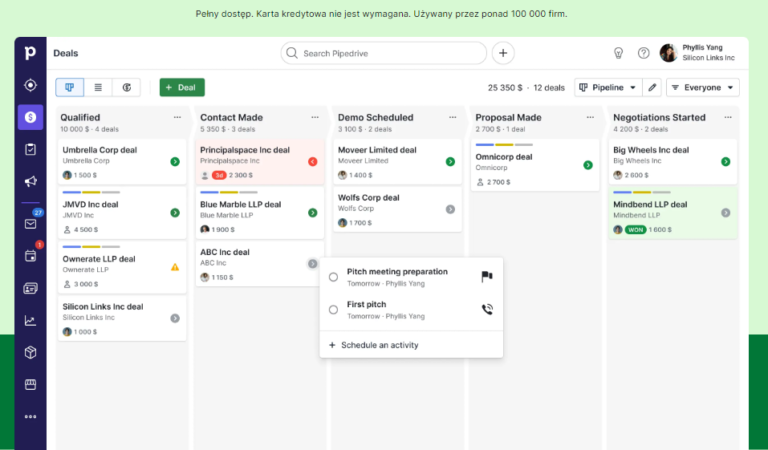
Pipedrive was created specifically for sales teams, and it shows in every aspect. The intuitive drag-and-drop interface and user-friendly platform allow teams to focus on selling rather than on the software.
Pipedrive offers numerous features that speed up the sales cycle, such as pipeline management, sales process automation, and built-in artificial intelligence. The Pipedrive app tracks sales, customers, and your salespeople, giving you comprehensive sales data to make informed decisions.
It serves as a central hub for customer information, enabling lead tracking, meeting organization, and sales process automation.
In this review, we will take a closer look at the features and benefits of Pipedrive CRM and learn how to choose the best CRM tool for your company.
Advantages of Using Pipedrive CRM
Pipedrive CRM offers many benefits for businesses looking to increase their sales and efficiency. Here are some key advantages of using Pipedrive:
- Simple and Intuitive Interface: Pipedrive has a straightforward and user-friendly interface that is easy to master, even for those with no CRM experience.
- Lead and Deal Management: Pipedrive allows you to track and manage leads and monitor progress throughout the sales process. You can easily assign tasks, set priorities, and track progress.
- Process Automation: Pipedrive offers automation features that can save time and effort. You can set up repetitive tasks such as sending notifications or scheduling meetings.
- Integrations with Other Tools: Pipedrive integrates easily with other popular tools such as Gmail, Outlook, and Slack. This allows you to sync data and communicate with clients seamlessly.
- Reporting and Analytics: Pipedrive provides reporting and analytics features that help track sales performance and the entire sales funnel.
How to Choose the Best CRM Tool for Your Company
Choosing the right CRM tool for your company can be challenging, given the numerous options available. Here are some factors to consider when selecting a CRM tool:
- Company Size: Consider whether the CRM tool is suitable for small, medium, or large companies. Some tools are better suited for small businesses, while others are more complex and may be better for larger organizations.
- Functionality: Check what features the CRM tool offers and whether they align with your needs. Do you need automation features, integrations with other tools, or advanced reporting?
- Intuitiveness and Ease of Use: Ensure that the CRM tool is user-friendly and intuitive for users. It should not be difficult to use and should be accessible for new users.
- Cost: Pay attention to the costs associated with the chosen CRM tool. Make sure the price fits your company’s budget and that the features offered are worth the investment.
- User Reviews: Read reviews from other users about the selected CRM tool. Check their experiences and whether they are satisfied with the tool.
Key Features of Pipedrive
Pipedrive CRM is one of the popular CRM tools on the market. It offers many features that can help manage sales and increase efficiency. Let’s take a closer look at these features:
Lead and Deal Management
Pipedrive allows easy management of leads and deals. You can track actions taken for each lead, the likelihood of closing the deal, and the forecasted revenue associated with these deals. You can assign tasks and set priorities to ensure that no sales opportunity is overlooked.
Process Automation
Pipedrive offers automation features. You can set up repetitive tasks such as sending meeting notifications, reminding about phone calls, or creating meeting schedules. This allows you to focus on the most important tasks and increase your efficiency.
Integrations with Other Tools
Pipedrive can be easily integrated with other popular tools such as Gmail, Outlook, and Slack. You can sync data, import contacts, and communicate with clients directly from Pipedrive. This makes work easier and ensures consistency of information throughout the company.
Analytics and Reporting
Pipedrive provides various reporting and analytics features that help track sales results and evaluate the effectiveness of actions. You can generate reports based on different criteria, such as sales value, sales process duration, or activity effectiveness. This helps you better understand your results and identify areas for improvement.
Pricing and Subscription Plans
Pipedrive offers different subscription plans, tailored to the needs and financial capabilities of companies. You can choose a plan that best fits your requirements and budget. Prices start from X dollars per month, and each plan offers different features and capabilities to meet users’ needs.
Summary and Alternatives to Pipedrive CRM
Pipedrive CRM is a tool that can help manage sales and increase efficiency. It offers many features that can facilitate the work of salespeople and sales teams. However, there are other CRM tools on the market worth considering. Here are some alternatives to Pipedrive:
- Zoho CRM: Zoho CRM offers a wide range of features and integrations that can meet the needs of various businesses. It is also more affordable than some other CRM tools.
- Salesforce: Salesforce is one of the most popular CRM tools on the market. It offers advanced features and capabilities tailored to the needs of large enterprises.
- HubSpot CRM: HubSpot CRM is a free CRM tool that offers basic features for managing contacts and sales opportunities. It is a good solution for small businesses with a limited budget.
Before choosing a CRM tool for your company, it is worth considering your needs, budget, and expectations. Remember that the CRM tool should be tailored to your individual needs and help you achieve your sales goals.