Fear not — you’ve come to the right place. In this comprehensive guide/comparison, we’ll navigate the CRM landscape together, equipping you with the knowledge to make an informed decision that will have your competitors green with envy.
We’ll cover everything from understanding the basics of CRM and sales management software to identifying key features, overcoming adoption challenges, and ultimately making your final selection. By the end of this guide, you’ll be a CRM expert, ready to lead your sales team to new heights of success.
So grab a cup of coffee, settle in, and let’s embark on this exciting journey together!
Understanding CRM and Sales Management Software
Before we dive into the nitty-gritty of selecting the best CRM for your business, let’s ensure we’re all on the same page. You might be wondering, “What exactly is a CRM, and how does it differ from sales management software?” Great question!
What is a CRM?
CRM, which stands for Customer Relationship Management, is a technology that helps businesses manage interactions with customers and potential leads. It’s like having a superhero sidekick that keeps track of all your customer data, from contact information to purchase history, empowering your sales team to build stronger relationships and close more deals.
Think of a CRM as a central hub where all your customer information lives. It’s a place where your sales reps can access vital data about each prospect or client, such as their communication history, preferences, and past purchases. By having this information at their fingertips, your team can provide personalized, timely interactions that foster trust and loyalty.
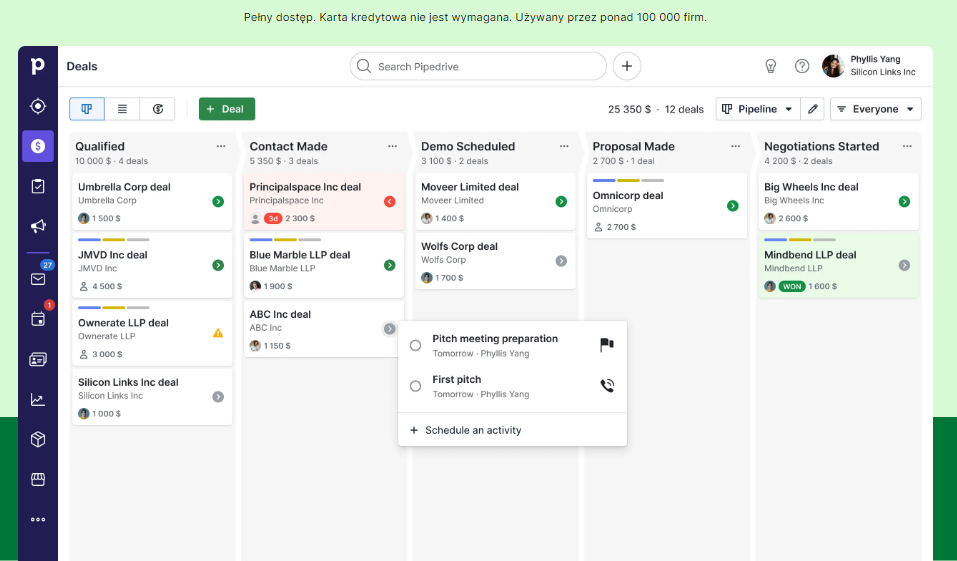
But a CRM isn’t just a glorified address book. It’s a powerful tool that can automate tasks, streamline processes, and provide valuable insights into your sales pipeline. With a CRM, you can:
- Track leads from initial contact to closed deal
- Manage tasks and activities to ensure timely follow-up
- Collaborate with team members on deals and accounts
- Analyze performance metrics and forecast future sales
- Integrate with other tools, such as email and marketing automation platforms
In essence, a CRM is designed to help your business build and maintain profitable customer relationships. It’s a game-changer for sales teams looking to work smarter, not harder.
What is Sales Management Software?
Now, let’s talk about sales management software. This is a term that often gets thrown around interchangeably with CRM, but there’s a subtle difference.
Sales management software is a subset of CRM that focuses specifically on—you guessed it—managing your sales processes. It’s the trusty toolbelt that enables your team to streamline workflows, track performance metrics, and collaborate seamlessly.
While all sales management software falls under the CRM umbrella, not all CRMs are built for sales management. Some cater to marketing or customer service needs, offering features like email campaign management or helpdesk ticketing.
When we talk about finding the best CRM for sales, we’re really looking for a robust sales management solution that empowers your team to sell more effectively. This might include features like:
- Lead and opportunity management
- Sales forecasting and pipeline tracking
- Quote and proposal generation
- Territory and commission management
- Sales analytics and reporting
The goal of sales management software is to give your team the tools they need to manage the entire sales cycle from start to finish. By automating repetitive tasks and providing visibility into key metrics, these solutions help reps focus on what they do best—selling!
The Benefits of Using a CRM for Sales
Now that we’ve covered the basics of CRM and sales management software, you might be thinking, “What are the real-world benefits of using these tools?” Another excellent question! Let’s explore some of the key advantages:
- Improved organization and efficiency: A CRM acts as a central repository for all your customer data, eliminating the need for reps to juggle multiple spreadsheets or sticky notes. With all the information they need in one place, reps can work more efficiently and avoid missing important details.
- Enhanced customer relationships: By tracking every interaction and leveraging customer data, reps can provide more personalized, relevant communications. This helps build trust and loyalty, leading to stronger, more profitable relationships over time.
- Increased sales productivity: A CRM automates many of the repetitive tasks that eat up reps’ time, such as logging calls or sending follow-up emails. This frees them up to focus on revenue-generating activities, like prospecting and closing deals.
- Better collaboration and communication: With a CRM, your entire team can access the same customer data and share updates in real time. This improves collaboration, reduces miscommunication, and ensures everyone is working together towards common goals.
- Actionable insights and reporting: A CRM provides valuable data on your sales pipeline, rep performance, and customer behavior. With customizable reports and dashboards, you can gain insights that help you make data-driven decisions and optimize your sales processes.
- Increased revenue and growth: By empowering your sales team to work more efficiently and effectively, a CRM can help you close more deals, retain more customers, and ultimately drive more revenue growth for your business.
Of course, these are just a few of the many benefits a CRM can offer. The specific advantages will depend on your unique business needs and goals. But one thing is clear—a CRM is an indispensable tool for any sales team looking to thrive in today’s competitive landscape.
Identifying Your Unique CRM Needs
Now that we’ve established the value of a CRM for sales, it’s time for some introspection. Before diving headfirst into the CRM pool, take a moment to consider your business’s unique requirements.
What challenges is your sales team currently facing? Do you need a solution that integrates with your existing tech stack? Are you looking for advanced reporting capabilities to gain deeper insights?
Here are some key questions to ask yourself and your team:
- What are our current pain points? Identify the specific challenges your sales team is facing, such as disorganized customer data, difficulty tracking deals, or lack of visibility into rep performance. These pain points will help guide your CRM search and ensure you find a solution that addresses your most pressing needs.
- How big is our team, and how fast are we growing? Consider the size of your sales team and your projected growth over the next few years. You’ll want to choose a CRM that can scale with your business and accommodate additional users as your team expands.
- What does our sales process look like? Map out your current sales process from lead generation to closed deal. Look for a CRM that can support and enhance each stage of your process, whether that means robust lead management, customizable deal stages, or automated workflows.
- What other tools do we use, and how important is integration? Take inventory of the other software tools your team relies on, such as email clients, marketing automation platforms, or accounting software. Consider how important it is for your CRM to integrate seamlessly with these tools and look for solutions that offer native integrations or open APIs.
- What’s our budget? Determine how much you’re willing to invest in a CRM solution, taking into account upfront costs, ongoing subscription fees, and any additional expenses for training, customization, or support. Keep in mind that a CRM is an investment that can pay dividends in increased productivity and revenue over time.
- What are our must-have features? Brainstorm with your team to identify the essential features your CRM must have, such as contact management, deal tracking, reporting, or mobile access. Prioritize these features based on their importance to your business goals.
- What level of customization do we need? Consider how much flexibility and customization you require in a CRM. Some businesses may need the ability to heavily tailor their solution to fit unique processes or branding requirements, while others may prefer a more turnkey solution.
By taking the time to thoroughly assess your needs upfront, you’ll be better equipped to evaluate potential CRM solutions and find the best fit for your business.
It may be helpful to create a requirements document or scorecard that you can use to compare different options and ensure you’re making an apples-to-apples comparison.
Remember, the “best” CRM is the one that aligns closely with your specific needs and goals. What works for one business may not be the ideal fit for another. Trust your instincts, involve your team in the decision-making process, and don’t be afraid to ask tough questions of potential vendors.
With a clear understanding of your unique requirements in hand, you’re ready to start exploring the key features to look for in a sales CRM. Let’s dive in!
Key Features to Look for in a Sales CRM
While every business has its own unique needs and priorities, there are certain features that any top-notch sales CRM should possess. These are the core capabilities that will help your team work more efficiently, close more deals, and ultimately drive more revenue for your business.
Let’s take a closer look at the essential ingredients in this recipe for sales success:
- Contact Management: A robust CRM should be your team’s central hub for storing and organizing customer data. Look for a solution that allows you to easily import, update, and segment your contacts based on various criteria, such as demographics, lead source, or purchase history. The ability to create custom fields and tailor your contact records to fit your unique business needs is also a plus.
- Deal and Opportunity Tracking: Your CRM should provide a clear, visual pipeline that helps you track the progress of each deal from initial contact to closed won. Look for features like customizable deal stages, drag-and-drop deal management, and the ability to attach relevant files and notes to each opportunity. Bonus points if your CRM can automatically calculate deal values and expected close dates based on your historical data.
- Task and Activity Management: Keep your team organized and accountable with a CRM that allows you to assign tasks, set reminders, and track the completion of key activities. Look for features like automated activity logging, task templates, and the ability to view tasks in a calendar or timeline view. This will help ensure that nothing falls through the cracks and that your team is always following up on important leads and deals.
- Reporting and Analytics: Data is the fuel that powers informed decision-making. Good tool should offer customizable reports and dashboards that provide real-time insights into your team’s performance, pipeline health, and forecasting. Look for a solution that offers a range of pre-built reports, as well as the ability to create custom reports based on your specific KPIs. The ability to schedule reports and share them with key stakeholders is also a valuable feature.
- Mobile Access: In today’s fast-paced world, your sales team needs to be able to access critical information on the go. Look for a CRM with a mobile app that enables reps to update deals, view customer data, and communicate with prospects from anywhere. The app should be intuitive and easy to use, with offline access and the ability to sync data seamlessly with the desktop version.
- Integrations: Your CRM should play nicely with the other tools in your tech stack, such as your email client, marketing automation platform, and accounting software. Integrations will save your team time and minimize data entry errors. Look for a CRM that offers native integrations with popular tools like Gmail, Outlook, Mailchimp, and QuickBooks, as well as an open API that allows you to build custom integrations as needed.
- Automation: The best CRMs help your team work smarter, not harder, by automating repetitive tasks and workflows. Look for features like automated lead assignment, email sequences, and task creation based on specific triggers or criteria. The ability to create custom workflows and automate complex processes can be a game-changer for sales teams looking to scale their efforts.
- Customization and Flexibility: Every business is unique, and your software should be able to adapt to your specific needs and processes. Look for a solution that offers a high degree of customization, from custom fields and layouts to bespoke workflows and branding options. The ability to tailor your CRM to fit your business will help drive user adoption and ensure that the tool is working for you, not against you.
- Ease of Use: A CRM is only valuable if your team actually uses it. Look for a solution with an intuitive, user-friendly interface that minimizes the learning curve for new users. The ability to personalize views and dashboards for each user can also help drive adoption and ensure that reps have access to the information they need most.
- Customer Support and Training: Even the best CRM will require some level of onboarding and ongoing support. Many software providers offer support options, such as phone, email, demo, and live chat.. The availability of training resources, such as webinars, tutorials, and in-person workshops, can also be valuable for getting your team up to speed quickly.
When evaluating potential CRM solutions, use this list of key features as a starting point for your comparison. Consider which capabilities are most important for your business and prioritize accordingly.
Don’t be afraid to dive deep into each feature and ask potential vendors for detailed demonstrations or case studies that showcase how their solution has helped similar businesses succeed.
Remember, a CRM is a long-term investment in your sales team’s success. Taking the time to thoroughly evaluate your options and choose a solution that aligns with your needs and goals will pay dividends in the form of increased productivity, efficiency, and revenue growth.
Overcoming Adoption Challenges
Congratulations! You’ve done your due diligence, evaluated multiple options, and finally selected the perfect CRM for your sales team. You’re excited to roll out this game-changing tool and watch the deals start rolling in. But wait, there’s a plot twist: your sales reps are resistant to change and skeptical about using a new system. Sound familiar?
If you’re nodding your head in recognition, don’t worry — you’re not alone. Adopting a new CRM can be a significant change for your sales team, and it’s not uncommon to encounter some resistance along the way. But here’s the good news: with the right approach and a bit of persistence, you can overcome these adoption challenges and get your team on board with your new CRM.
Here are some proven strategies for winning over even the most stubborn holdouts:
- Involve your reps in the selection process: One of the best ways to get buy-in from your team is to involve them in the CRM selection process from the very beginning. Give them a voice in evaluating potential solutions and let them weigh in on which features and capabilities are most important to their day-to-day work. When reps feel heard and valued, they’re more likely to embrace the final decision and champion the new tool to their peers.
- Communicate the benefits clearly: Make sure your team understands the “why” behind your CRM selection. Clearly communicate how the new tool will benefit them individually and as a team, whether that means saving time on repetitive tasks, providing better visibility into pipeline health, or enabling more effective collaboration. Use specific examples and case studies to illustrate the potential impact on their daily work and overall success.
- Provide comprehensive training: Don’t just toss your reps into the deep end and expect them to swim. Invest in thorough, hands-on training that covers the key features and workflows they’ll use every day. Consider offering a mix of in-person and online training options to accommodate different learning styles and schedules. And don’t forget about ongoing training and support to help reps continue to build their skills and adopt new features over time.
- Start with a pilot group: If you have a large sales team or multiple departments using the CRM, consider starting with a smaller pilot group before rolling out the tool to everyone. This allows you to test drive the system with a more manageable group of users, gather feedback, and make any necessary adjustments before a wider launch. It also gives you a group of early adopters and champions who can help evangelize the tool to their peers.
- Appoint ambassadors: Identify a few key influencers or high performers on your sales team and enlist them as CRM ambassadors. These individuals can serve as go-to resources for their colleagues, answering questions, sharing best practices, and providing peer-to-peer support. They can also provide valuable feedback to leadership on how the tool is being used in the field and any areas for improvement.
- Celebrate wins and share success stories: As your team starts using the CRM, make a point to celebrate the wins, no matter how small. Did a rep close a big deal thanks to better pipeline visibility? Did a team hit their quota faster by leveraging automated workflows? Share these success stories widely and publicly recognize the individuals involved. This positive reinforcement will help build momentum and encourage others to fully embrace the tool.
- Lead by example: If you want your team to embrace the CRM, you need to be its biggest cheerleader. Use the tool religiously yourself and share how it’s making your own work more efficient and effective. Attend training sessions alongside your reps and be open about your own learning curve. When your team sees leadership walking the walk, they’ll be more likely to follow suit.
- Make it fun: Gamification and friendly competition can be powerful motivators for adoption. Consider creating leaderboards or contests that reward reps for hitting certain milestones or showcasing creative uses of the CRM. You could offer prizes like gift cards. A little healthy competition can go a long way in getting reps excited about using new software.
- Solicit ongoing feedback: Don’t assume that your work is done once the CRM is up and running. Continuously seek feedback from your team on what’s working well and what could be improved. Use surveys, focus groups, or one-on-one conversations to gather insights and ideas. Be open to making changes and tweaks based on user feedback to ensure that the CRM remains a valuable tool for your team.
Overcoming adoption challenges requires a combination of strategic planning, effective communication, and ongoing support.
By involving your team from the start, clearly articulating the benefits, and providing training and resources, you can set your sales reps up for success and ensure that your CRM investment pays off.
Making Your Final CRM Selection
Congratulations! You’ve made it to the final stage of your CRM journey. You’ve done your research, identified your unique needs, and evaluated multiple options based on key features and capabilities. Now it’s time to make your final selection and embark on the exciting process of implementation and adoption.
Before we dive into some tips for making your final decision, let’s take a moment to recap the key steps you’ve taken to get to this point:
- You’ve gained a solid understanding of what a CRM is, how it differs from sales management software, and the key benefits it can offer your sales team.
- You’ve taken the time to assess your team’s specific requirements, pain points, and goals, creating a clear picture of what you need in a CRM solution.
- You’ve explored the essential features to look for in a sales CRM, from contact management and deal tracking to reporting and automation, and prioritized the capabilities that matter most to your business.
- You’ve proactively thought about the potential obstacles to CRM adoption and developed a strategy for overcoming resistance and driving user engagement.
With this solid foundation in place, you’re well-equipped to make an informed decision and choose a CRM that will set your sales team up for success. Here are a few final tips to guide you through the selection process:
- Take advantage of free trials and demos: One of the best ways to get a feel for a CRM is to take it for a test drive. Most vendors offer free trials or demos that allow you to explore the tool’s features and functionality in depth. Take advantage of these opportunities to get hands-on with your top contenders and see how they perform in real-world scenarios.
- Get input from key stakeholders: While the sales team will be the primary users of the CRM, it’s important to get buy-in from other key stakeholders, such as IT, marketing, and customer service. Involve these teams in the evaluation process and solicit their feedback on how well each option integrates with existing systems and supports cross-functional collaboration.
- Consider total cost of ownership: While the upfront cost of a CRM is certainly an important factor, don’t forget to consider the total cost of ownership over time. This includes ongoing subscription fees, any additional costs for customization or integration, and the time and resources required for training and support. Look for a solution that offers a strong return on investment and aligns with your long-term budget and growth plans.
- Evaluate vendor support and resources: Your relationship with your CRM vendor doesn’t end once the contract is signed. Look for a partner that offers robust support and resources to help you get the most out of the tool over time. This might include a dedicated account manager, 24/7 technical support, software updates, online knowledge bases, user communities, and ongoing training and education.
- Trust your gut: At the end of the day, you know your business best. If a particular CRM feels like the right fit for your team and aligns closely with your unique needs and goals, trust your instincts. Don’t get too caught up in comparing feature lists or chasing the latest bells and whistles. Focus on finding a solution that will help your team work more efficiently, effectively, and collaboratively in the long run.
Making a final CRM selection can feel like a daunting task, but remember that you’ve done the hard work to get to this point. By following a structured evaluation process and keeping your team’s needs front and center, you can make a confident decision that will pay dividends for years to come.
Common Questions and Concerns
As we near the end of our journey through the world of CRM selection, you may still have some lingering questions or concerns. Let’s take a moment to address a few of the most common ones:
- How long does it take to implement a CRM?
The timeline for CRM implementation can vary widely depending on the size and complexity of your organization, the specific solution you choose, and the level of customization required. On average, a CRM implementation can take anywhere from a few weeks to several months.
To ensure a smooth and efficient implementation process, it’s important to:
- Clearly define your goals and requirements upfront
- Allocate sufficient time and resources for data migration, customization, and testing
- Provide thorough training and support for end-users
- Work closely with your vendor’s implementation team to troubleshoot any issues that arise
- How much does a CRM cost?
CRM pricing can range from a few dollars per user per month for basic solutions to hundreds or even thousands of dollars per month for enterprise-level platforms with advanced features and customization options.
Some factors that can impact CRM pricing include:
- The number of users
- The specific features and capabilities included
- The level of customization and integration required
- The deployment model (cloud-based vs. on-premise)
- The length of the contract term
When evaluating CRM pricing, be sure to consider the total cost of ownership, including any additional fees for onboarding, training, support, or upgrades over time.
- How do I ensure data security in my CRM?
Data security is a critical concern for any business, particularly when it comes to sensitive customer information. To ensure the security of your data in a CRM, look for a solution that offers:
- Secure, encrypted data storage and transmission
- Role-based access controls and user permissions
- Regular data backups and disaster recovery processes
- Compliance with relevant industry regulations (e.g., GDPR, HIPAA)
- Third-party security audits and certifications
Additionally, be sure to train your team on best practices for data security, such as using strong passwords, logging out of the system when not in use, and avoiding sharing login credentials.
- Can a CRM integrate with my existing tools and systems?
Most modern CRMs offer a wide range of integrations with popular business tools and systems, such as email clients, marketing automation platforms, and accounting software. When evaluating potential CRM solutions, be sure to ask about their integration capabilities and whether they offer pre-built connectors or open APIs for custom integrations.
Some common integrations to look for include:
- Email integration (e.g., Gmail, Outlook)
- Calendar integration (e.g., Google Calendar, Microsoft 365)
- Marketing automation (e.g., Mailchimp, HubSpot)
- Social media (e.g., Facebook, Twitter, LinkedIn)
- E-commerce (e.g., Shopify, Magento)
- Customer service (e.g., Zendesk, Freshdesk)
By integrating your CRM with your existing tools and systems, you can streamline workflows, reduce manual data entry, and gain a more complete view of your customers across all touchpoints.
- How do I measure the success of my CRM implementation?
To gauge the success of your CRM implementation and ensure that you’re getting a positive return on investment, it’s important to establish clear metrics and KPIs (key performance indicators) upfront. Some common CRM success metrics include:
- User adoption rates
- Data accuracy and completeness
- Sales productivity (e.g., lead response times, conversion rates, deal size)
- Customer satisfaction and retention
- Revenue growth and profitability
Be sure to benchmark your current performance in each of these areas before implementing a CRM, and then track your progress over time. Regular reporting and analysis can help you identify areas for improvement and make data-driven decisions to optimize your sales processes.
- What if my team is resistant to using a new CRM?
As we discussed earlier, user adoption is one of the biggest challenges of implementing a new CRM. To overcome resistance and ensure that your team embraces the tool, try the following strategies:
- Involve end-users in the selection and implementation process
- Clearly communicate the benefits of the CRM and how it will make their jobs easier
- Provide comprehensive training and ongoing support
- Celebrate successes and share positive user stories
- Solicit feedback regularly and be open to making changes based on user input
Remember, a CRM is only valuable if your team actually uses it. By taking a proactive approach to change management and focusing on the needs and concerns of your end-users, you can drive adoption and ensure that your investment pays off.
Conclusion
Phew! We’ve covered a lot of ground in this ultimate guide to selecting the best CRM for your sales team. From understanding the basics of CRM and sales management software to evaluating key features, overcoming adoption challenges, and making a final selection, you’re now equipped with the knowledge and tools you need to make an informed decision.
As we wrap up, let’s review some of the key takeaways:
- A CRM is a powerful tool for managing customer relationships, automating sales processes, and driving growth and profitability. By choosing the right solution for your business, you can empower your sales team to work more efficiently and effectively.
- To find the best CRM for your needs, start by clearly defining your requirements and goals. Consider factors such as team size, sales process, integration needs, and budget.
- When evaluating potential solutions, focus on key features such as contact management, deal tracking, reporting, automation, and ease of use. Look for a solution that aligns closely with your unique needs and priorities.
- To ensure successful adoption and implementation, involve your team from the start, provide comprehensive training and support, and continuously solicit feedback and make improvements over time.
- Don’t forget to establish clear metrics and KPIs to measure the success of your implementation and optimize your sales processes over time.
Selecting and implementing a CRM software is not a one-time event, but rather an ongoing journey of learning, iteration, and growth. By staying focused on your goals, listening to your team, and continually adapting to new challenges and opportunities, you can unleash the full potential of your sales organization and take your business to new heights.
Remember, a CRM is a tool —a powerful one, but still just a tool. The real magic happens when you combine the right technology with a talented, motivated team and a customer-centric mindset.
By putting your customers at the center of everything you do and empowering your sales reps to build strong, lasting relationships, you can create a sustainable competitive advantage and drive long-term success.
So what are you waiting for? Armed with the insights and strategies outlined in this guide, you’re ready to take the next step in your journey. Whether you’re a small business owner looking to streamline your sales process or an enterprise seeking to optimize your customer interactions across multiple touchpoints, there’s a CRM out there that’s perfect for you.
So go forth and conquer the world of CRM! With the right tool and the right mindset, there’s no limit to what you and your team can achieve. Happy selling!